Oracle RADIUS (Duo, Okta MFA) sign-in and tnsnames.ora on the Mac
Posted by Kyle Hankinson November 13, 2026
More and more Oracle shops are moving their databases behind RADIUS, with Duo or Okta supplying the second factor. The database stops checking your password itself and hands the sign-in to a RADIUS server, which may send a push to your phone before it lets you in. If your tools do not speak RADIUS, the login fails with ORA-01017 no matter how carefully you type the password, and the usual advice is "use SQL Developer".
SQLPro Studio and SQLPro for Oracle now sign in to Oracle through RADIUS, and on the Mac they can also read your connections straight from tnsnames.ora. Neither needs Oracle Instant Client, Java or a JDBC driver.
RADIUS sign-in
If you have set this up in SQL Developer, you added a property to the connection: oracle.net.authentication_services with the value RADIUS. The setting here is the same idea with a friendlier name.
Open an Oracle connection (a new one or one you already have) and change Authentication from "Database password" to RADIUS (MFA). Enter your login and password as usual and connect.
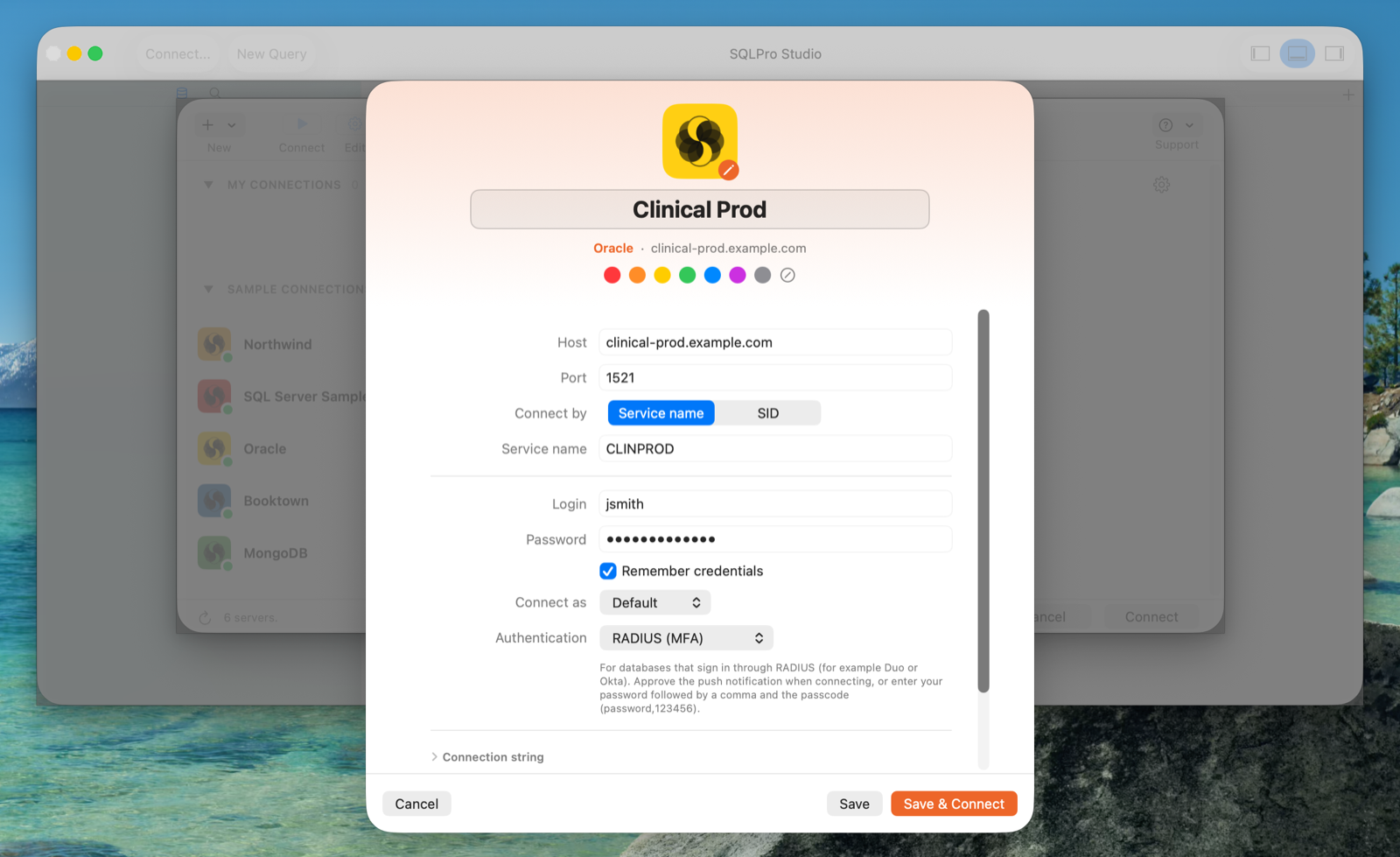
What happens next depends on how your organization set up the second factor:
- Push notification. The connection waits while Duo or Okta sends the push to your phone. Approve it and the connection opens. The app waits up to two minutes, so there is no rush.
- Passcode. If you use a code from an authenticator app or a hardware token, type it after your password, separated by a comma:
mypassword,123456. This is the convention Duo and most RADIUS servers use. - No prompt at all. Some sites switch the database to RADIUS first and turn the second factor on later. In that case it simply connects.
One sign-in per connection
A database client normally opens several sessions behind your back: one for the sidebar, one per query tab, another for background lookups. With RADIUS each new session is a new login, which would mean a push for every tab you open.
To avoid that, a RADIUS connection shares one signed-in session across the whole window and reuses it for the sidebar, your tabs and everything else. You approve one push when you connect, and that is normally the only one. The exception is when two things truly have to run at the same moment, for example a long query in one tab while you run another in a second tab. The app waits up to ten seconds for the first to finish, and only then opens one more session, which costs one more approval.
Clearer errors
When the RADIUS server turns a sign-in down, Oracle reports the same ORA-01017 it uses for a mistyped password. The app adds a line saying the RADIUS server rejected the sign-in and what to check: the password, the push, or a passcode. A push that nobody approves is reported as a timed-out MFA sign-in instead of a bare network timeout.
Connections from tnsnames.ora
Most Oracle sites keep their connection list in a tnsnames.ora file, often next to a sqlnet.ora, and the DBA team updates it when servers move. Retyping every host, port and service name into another tool is tedious, and it goes stale the first time something changes.
On the Mac you can now point the app at the folder that holds those files:
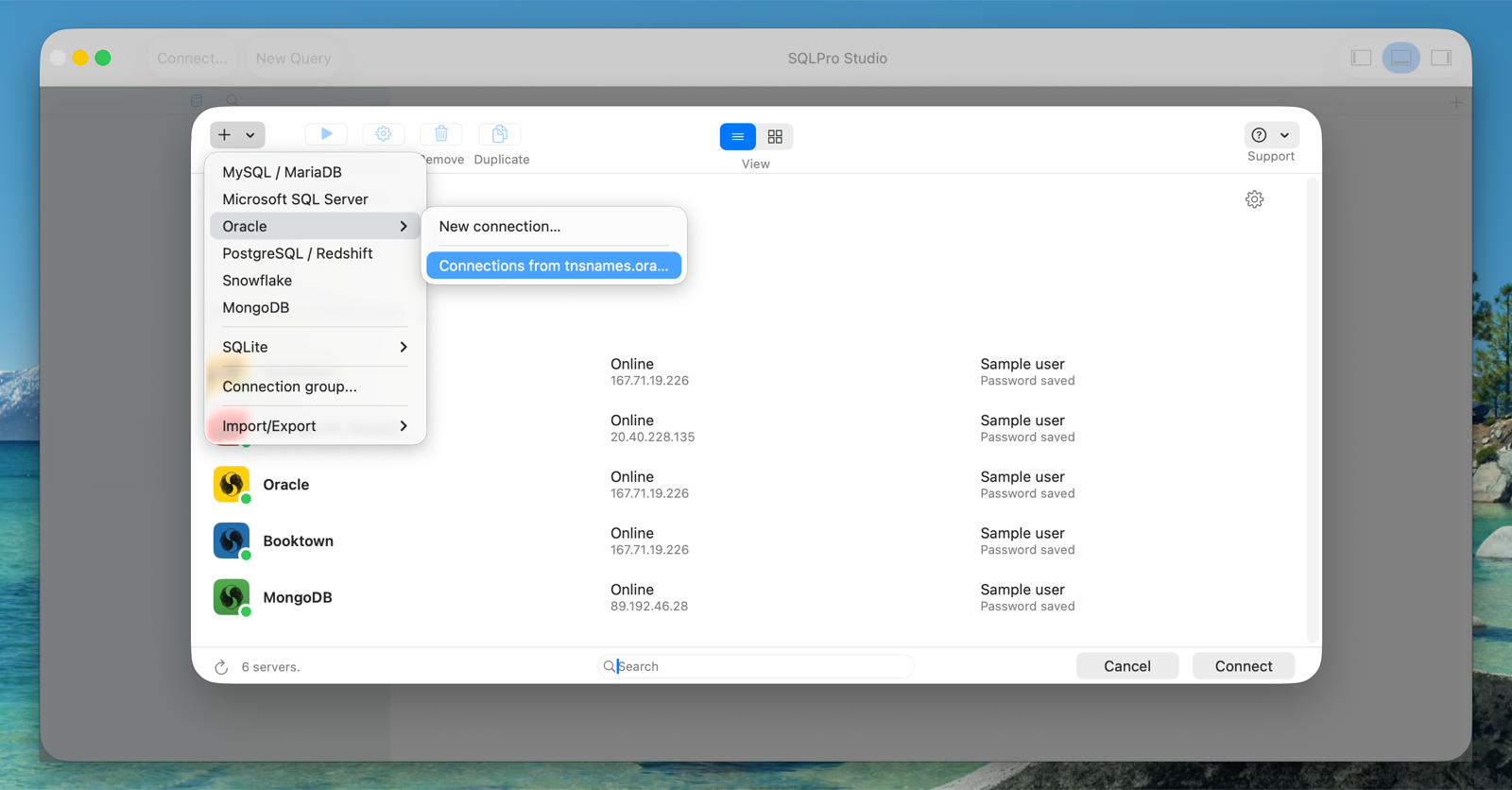
- Open the connection window and choose New > Oracle > Connections from tnsnames.ora...
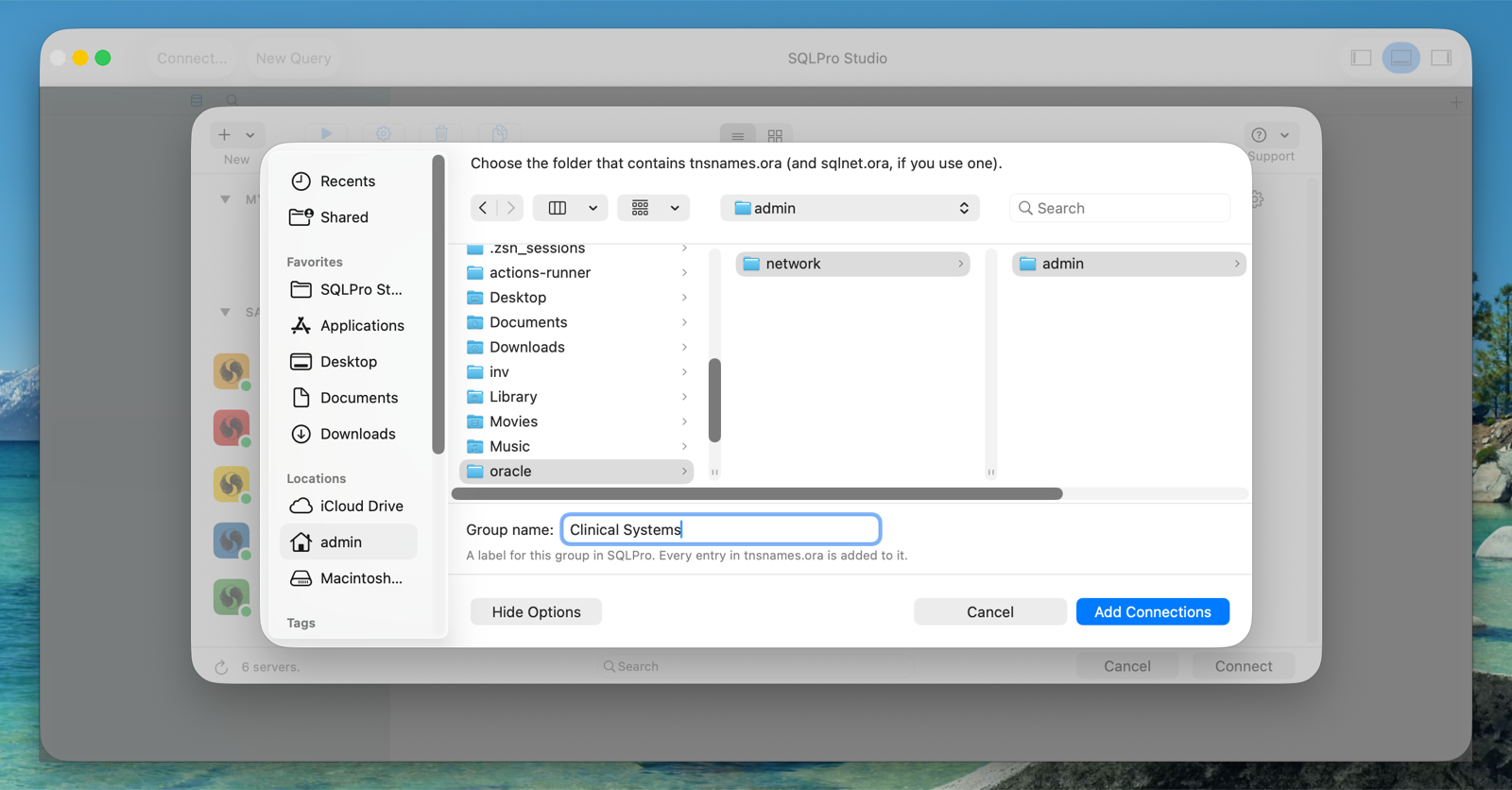
- Pick the folder that contains
tnsnames.ora(the one Oracle callsTNS_ADMIN;~/.oracleis a common home for it, and the dialog shows hidden folders). - Give the group a name. It is only a label; every entry in the file is added.
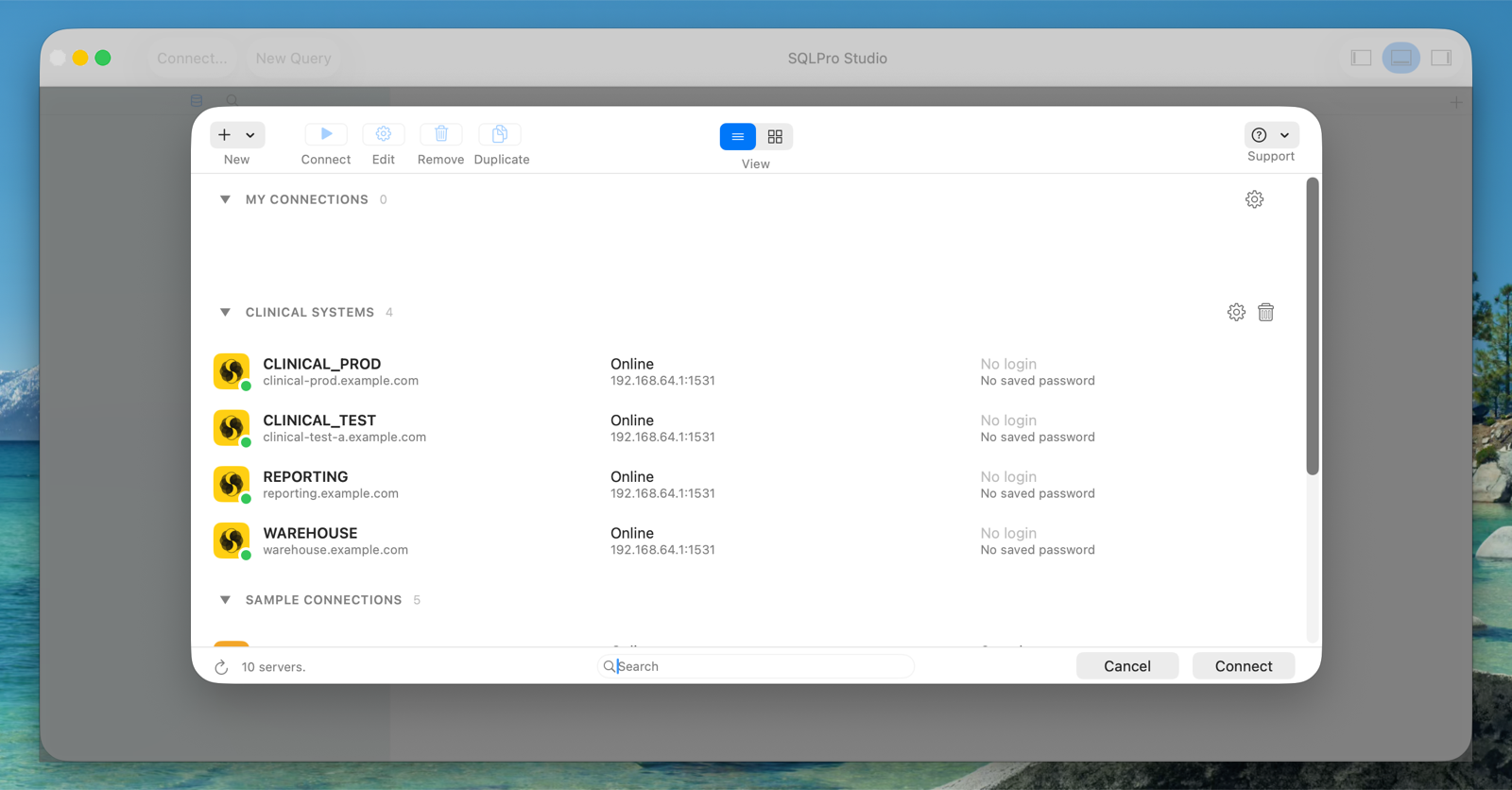
The entries appear as their own group in the connection list, one row per alias.
The file stays in charge
The group is read from the folder every time the connection window opens. When the DBA team adds a database or moves one to a new host, it shows up the next time you open the window, with no import step to repeat. Rows in the group cannot be deleted or re-pointed from inside the app, because the file is the source of truth.
A few details:
sqlnet.orais honored for sign-in. If it containsSQLNET.AUTHENTICATION_SERVICES = (RADIUS), every connection in the group defaults to RADIUS. You can still change it per connection.- Failover lists work. An entry with several addresses tries them in order and skips a dead one after five seconds. A
DESCRIPTION_LISTwith a primary and a standby is tried one description at a time. IFILEincludes are followed, as long as the included file is inside the folder you picked.- Entries the app cannot use are skipped and counted. Local
IPCandBEQentries need an Oracle client on the same machine, so the group title tells you how many were left out instead of failing the whole file.
Your login is still yours
tnsnames.ora is an address book. It says where each database is, not who you are, so the first time you connect to a row the app opens its settings and asks for your login and password. After that it remembers them.
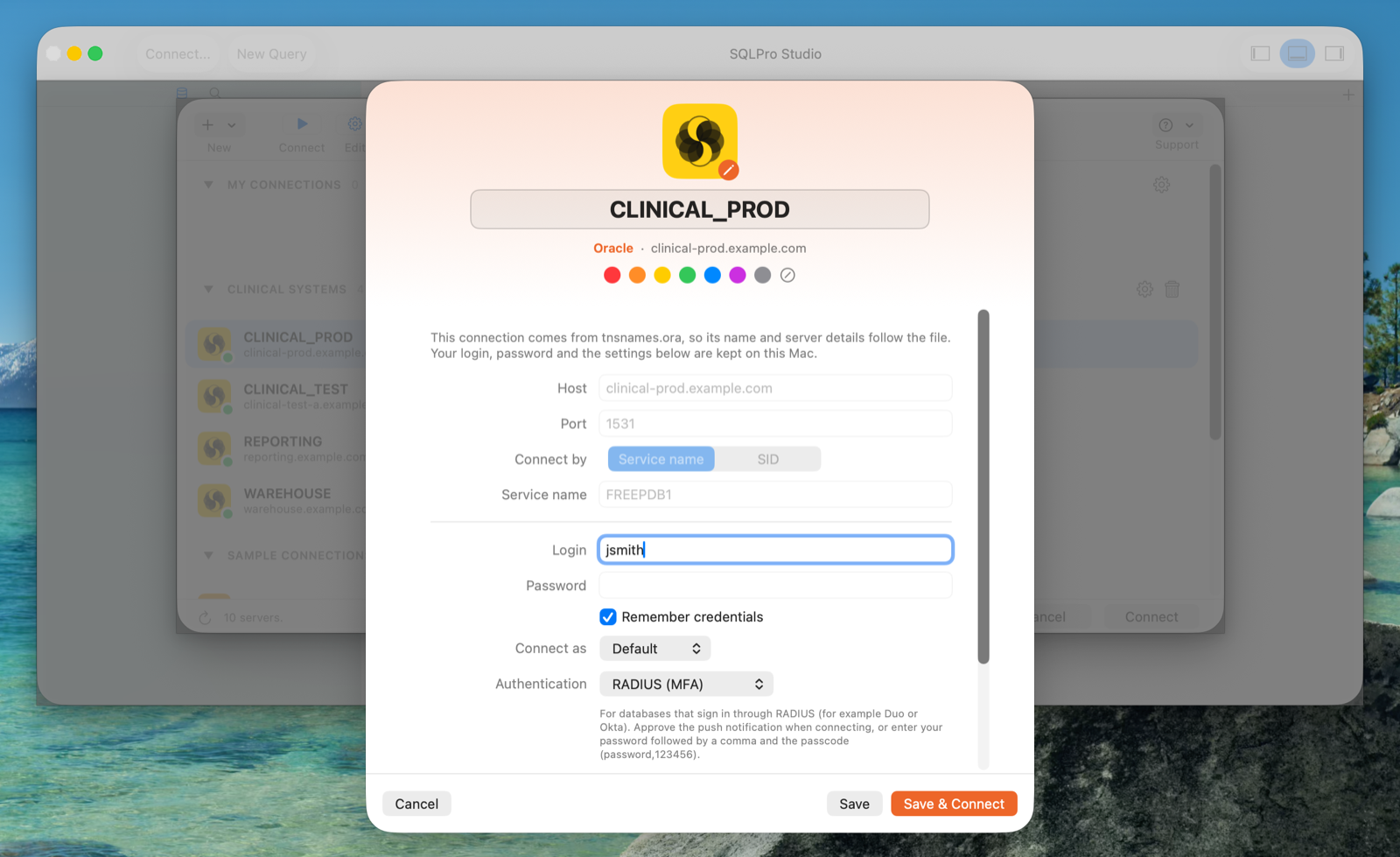
What you add is kept separately from the file and stays on your Mac: the login, authentication and color in the app's own settings, and a remembered password in your Mac's keychain. These connections are deliberately left out of iCloud sync, so a list that belongs to your employer does not end up on your other devices. Renaming the group keeps every saved login attached. Removing the group forgets the folder and deletes those saved logins; the files themselves are never changed.
Prefer to paste a single entry?
You do not have to use the folder. The Connection string field of an ordinary Oracle connection now accepts a full descriptor, or a whole entry copied out of tnsnames.ora, spaces and line breaks included:
CLINICAL_PROD =
  (DESCRIPTION =
    (ADDRESS = (PROTOCOL = TCP)(HOST = clinical-prod.example.com)(PORT = 1521))
    (CONNECT_DATA = (SERVICE_NAME = clinprod))
  )
When that field is filled in, it takes the place of the host, port and service fields.
What is not covered yet
- Challenge-response RADIUS. Setups where the server answers with a question and expects a typed reply in a second step are not supported. Push approval and the
password,passcodeform are. - RADIUS over TCPS only. Oracle 23ai and later prefer RADIUS over an encrypted TCPS listener by default. If your server accepts nothing else, this release will not connect to it yet.
- iPhone and iPad get the RADIUS sign-in but not the
tnsnames.oragroups.
On the server side nothing changes for this feature. Your DBA has already done the work if RADIUS logins function in SQL Developer. Oracle documents that setup in Configuring RADIUS Authentication, and the file formats in Local Naming Parameters in the tnsnames.ora File and Parameters for the sqlnet.ora File.
Where to get it
Both features are in version 2026.317 for macOS, which you can download here. The Mac App Store versions and the iPhone and iPad apps follow with their next updates.
If a connection that works in SQL Developer does not work here, we want to know. Use the Support button in the connection window and include the error message and your Oracle server version (select banner from v$version). If you are sorting out service names versus SIDs at the same time, our guide to ORA-12514 and ORA-12154 covers that part.
Tags: Feature Oracle
SSH Tunnels for Remote Database Access: ssh -L, Explained
Posted by Kyle Hankinson August 28, 2026
A production database with port 3306 or 5432 open to the internet is a breach waiting for a scanner to find it, so sane deployments keep the database on a private network and expose exactly one hardened thing: an SSH server, usually called a bastion or jump host. To query the database from your laptop, you tunnel through it. The command is one line, but most explanations skip which machine each part refers to, and that gap is where all the confusing failures live.
ssh -N -L 15432:db.internal:5432 you@bastion.example.comReading left to right, the -L argument is local_port:target_host:target_port, and the three parts belong to three different machines:
| Piece | Where it lives | What it means |
|---|---|---|
15432 |
your laptop | ssh opens this port on 127.0.0.1 and listens |
db.internal:5432 |
resolved by the bastion | where the bastion forwards each connection |
you@bastion.example.com |
the bastion | the only machine you need SSH access to |
The part people miss: db.internal is resolved by the bastion, not by your laptop. It can be a private DNS name or a 10.x address that means nothing on your side; it only has to be reachable from the bastion. By the same logic, writing 127.0.0.1 there means the bastion itself, which is what you want when the database runs on the same box as the SSH server. -N just means "forward ports, do not run a remote shell".
Once the tunnel is up, you point your database client at your own machine:
psql -h 127.0.0.1 -p 15432 -U app_user mydbYour normal database credentials still apply. SSH authentication gets you a path to the database; it does not log you into it. Two locks, two keys.
Proving it works end to end
Claims about networking deserve a demonstration, so I built the whole topology locally with Docker: a postgres:16 container with no published ports (verified: docker port shows nothing, so nothing on my Mac can reach it directly) and an OpenSSH bastion container on the same private network, publishing only its SSH port. Then, from the Mac:
ssh -i tunnel_key -p 2222 -N -L 15555:tun-pg:5432 tunneluser@127.0.0.1Note that tun-pg is a container name only the bastion's network can resolve, exactly like db.internal above. With the tunnel up, psql connected through the forwarded port 15555 on my machine using the ordinary Postgres password, and:
SELECT version();
PostgreSQL 16.14 (Debian 16.14-1.pgdg13+1) on aarch64-unknown-linux-gnu ...
One more query is worth running, because it exposes a detail that bites later:
SELECT inet_server_addr(), inet_client_addr();
 inet_server_addr | inet_client_addr
------------------+------------------
 172.18.0.2       | 172.18.0.3
The client address is the bastion's IP, not my machine's. As far as the database can tell, the bastion connected to it. That is why a pg_hba.conf rule scoped to your office IP will not match a tunneled connection, and why a MySQL grant like 'app'@'203.0.113.%' fails through a tunnel: the source the server sees is the bastion (or, when the daemon does the forwarding differently, its loopback). PostgreSQL's manual has a short chapter on tunnels that makes the same point.
The MySQL localhost trap
MySQL adds one gotcha of its own: to the MySQL client, the hostname localhost does not mean 127.0.0.1. It means "use the Unix socket", which skips TCP entirely and therefore skips your tunnel. I verified against a MySQL 8 server by running status after connecting both ways:
mysql -h localhost  ->  Connection: Localhost via UNIX socket
mysql -h 127.0.0.1  ->  Connection: 127.0.0.1 via TCP/IP
So a tunneled MySQL connection must use -h 127.0.0.1 -P 13306, never -h localhost. If you have ever had a tunnel "work" while clearly hitting the wrong server, or fail with a socket error mentioning /tmp/mysql.sock, this was it. The behavior is documented on MySQL's connecting page.
The other engines each have one note worth knowing. SQL Server tunnels fine to its fixed port 1433, but named instances use dynamic ports assigned at startup; pin the instance to a static port before trying to forward to it. Oracle tunnels to the listener on 1521, and the tunnel solves only the network layer: you still need the correct service name on the other side, or you trade your firewall problem for an ORA-12514 (decoded in SID vs service name vs TNS). And SQLite is the reminder that not everything needs a tunnel: it is a file, so copy the file.
When the tunnel fails: three errors, decoded
Every message below is one I captured from a real failing tunnel, and each points at a different culprit.
channel 2: open failed: administratively prohibited: open failedThe SSH server is refusing to forward. My bastion image ships with AllowTcpForwarding no in sshd_config, and this is exactly what the client printed until I changed it. If you see this, the fix is on the server (or in your hosting provider's policy), not in your command.
bind [0.0.0.0]:15555: Address already in use
channel_setup_fwd_listener_tcpip: cannot listen to port: 15555
Something on your laptop already owns that local port. Nine times out of ten it is a previous tunnel you forgot about; find it with lsof -i :15555 or just pick another port.
channel 2: open failed: connect failed: Connection refusedThe subtle one. SSH is connected and forwarding happily, but the bastion could not reach the target host and port. The tunnel itself accepts your client's connection, then fails only when traffic flows, so your database client reports a dropped connection rather than anything mentioning SSH. I produced this by pointing the tunnel at port 5433 instead of 5432. Wrong target port, wrong target host, or a database that is down all land here.
For tunnels you keep open all day, three flags earn their keep: -N as above, -f to background ssh after authentication, and -o ServerAliveInterval=30 so idle tunnels survive aggressive NAT timeouts. If the database is two hops away, -J first-bastion chains jump hosts without nesting tunnels by hand. The full option reference is the OpenSSH manual.
If you would rather not babysit terminal windows, this is one of the few things a GUI can genuinely automate rather than merely wrap: SQLPro Studio lets you attach an SSH tunnel to a connection (bastion host, port, user, key or password), then opens the forwarding and points the client at it every time you connect, which is precisely the -L mechanics above minus the shell. Whether you script it or click it, the mental model stays the same: one listener on your machine, one hop through the bastion, and a database that still thinks it never talked to the outside world.
Tags: MySQL PostgreSQL Microsoft SQL Server Oracle
ORA-12514 and ORA-12154: SID vs Service Name vs TNS, Explained
Posted by Kyle Hankinson August 11, 2026
Someone hands you a host, a port, and "the database name", you type them into a client, and Oracle answers with this:
ORA-12514: Cannot connect to database. Service SALESDB is not
registered with the listener at host 127.0.0.1 port 1521.
That is the current wording; releases before 23ai phrase it as ORA-12514: TNS:listener does not currently know of service requested in connect descriptor, which is the string most search results still show. Either way, the error never says what is usually wrong: you gave the right name of the wrong kind, or the right kind with a stale name. Oracle has three different ways to identify a database, and every ORA-125xx error is really telling you which layer of the connection gave up.
The three identifiers
SID (system identifier) names an instance, the set of Oracle processes and memory running on the server. It is the oldest scheme, and old JDBC strings use it with a colon: host:1521:ORCL.
Service name is what an instance registers with the listener. One instance can register several services, and since Oracle 12c each pluggable database (PDB) registers its own. EZConnect uses a slash: host:1521/FREEPDB1.
TNS alias is a client-side nickname (like PRODDB) that your local tnsnames.ora file expands into a full host/port/service descriptor. The server is not involved in resolving it at all. Oracle's Net Services guide covers how registration and resolution fit together.
The colon-versus-slash distinction matters more than it looks. host:1521:FREEPDB1 asks the listener for a SID named FREEPDB1; host:1521/FREEPDB1 asks for a service. Same characters, different question, different error when it fails.
One error per layer
A connection attempt passes through your client config, the network, the listener, and finally database authentication. Each stage has its own failure code, so the error you get locates the problem for you:
| Error | Layer that failed | What it actually means |
|---|---|---|
| ORA-12154 | your machine | The TNS alias could not be resolved. The server was never contacted. |
| ORA-12541 | network | Nothing is listening at that host and port. Wrong port, server down, or a firewall. |
| ORA-12514 | listener | The listener is up but no service by that name is registered. |
| ORA-12505 | listener | The listener is up but no SID by that name is registered. |
| ORA-01017 | database | You reached the database. Username or password is wrong. |
I reproduced all five against Oracle Database Free 23ai running in Docker (gvenzl/oracle-free:23-slim), and the modern messages are refreshingly explicit. A wrong SID:
ORA-12505: Cannot connect to database. SID FREEPDB1 is not registered
with the listener at host 127.0.0.1 port 1521.
Note what happened there: FREEPDB1 is a perfectly valid service on that server, but I asked for it as a SID and the listener refused. That single test is the whole SID-versus-service confusion in miniature. A wrong port:
ORA-12541: Cannot connect. No listener at host 127.0.0.1 port 1599.An alias missing from tnsnames.ora:
ORA-12154: Cannot connect to database. Cannot find alias PRODDB in
/opt/oracle/product/26ai/dbhomeFree/network/admin/tnsnames.ora.
ORA-12154 deserves special emphasis because people burn hours restarting servers over it: the message names a file on your own machine. The network was never touched. Fix the alias, point TNS_ADMIN at the right directory, or skip TNS entirely and use host:port/service directly.
And with everything right except the password:
ORA-01017: invalid credential or not authorized; logon deniedOne footnote on ORA-01017: passwords have been case-sensitive since 11g, so a password that worked on an ancient system in uppercase may fail verbatim on a newer one.
Finding the service name you actually need
When ORA-12514 strikes, stop guessing and ask the server what it has. On the database host:
$ lsnrctl status
...
Services Summary...
Service "FREE" has 1 instance(s).
Service "FREEXDB" has 1 instance(s).
Service "freepdb1" has 1 instance(s).
Or, from any session that can connect (a DBA, or you via a different tool):
SELECT name FROM v$services;On my container that returns exactly one row, freepdb1, which is the service application connections should use. Service names are case-insensitive when you connect, so FREEPDB1 works fine.
Why your old SID stopped working: multitenant
Since 12c, Oracle's multitenant architecture splits a server into a container database (CDB) and pluggable databases (PDBs), and from 21c on, multitenant is the only option. Your tables live in a PDB, and a PDB is reachable only by service name. It has no SID.
This is the story behind most "it worked before the upgrade" tickets. The old host:1521:ORCL string named the instance; after migration to multitenant, that instance is the CDB, and your schema now lives in a PDB like ORCLPDB1. Depending on the driver, the SID string either fails outright or, worse, connects you to the CDB root where none of your tables exist, producing mysterious ORA-00942 errors on tables you can see in another tool. On the Docker image the split is visible immediately: service FREE is the CDB, FREEPDB1 is the PDB where the app user's schema lives.
The rule of thumb for anything modern: use the service name, with a slash. Reserve SID syntax for legacy servers that genuinely predate services, which in practice means almost nothing still in production.
Plugging the right value into a GUI client
Connection editors mirror the same distinction, so this decoder maps directly onto the form fields. SQLPro Studio's Oracle connection editor, for example, takes a host, a port, and a name you mark as either a service name or a SID; choosing the wrong kind produces exactly the ORA-12514 or ORA-12505 you would get on the command line, so the table above tells you which toggle to flip. For a local playground, docker run -d -p 1521:1521 -e ORACLE_PASSWORD=test gvenzl/oracle-free:23-slim gives you a server whose answers are always the same: port 1521, service name FREEPDB1.
A last diagnostic habit worth keeping: read the error as a progress report. ORA-12154 means you never left the laptop. ORA-12541 means you found the machine but not the listener. ORA-12514 and ORA-12505 mean the listener heard you and vetoed the name. ORA-01017 means the whole network path is fine and only the credentials are wrong, so stop editing tnsnames.ora. Each code eliminates every layer before it, and working through them in order beats changing three settings at once.
Once you are connected, Oracle has a few more surprises waiting for arrivals from other databases; the first one most people hit is pagination, covered in Oracle pagination: ROWNUM vs FETCH FIRST. Oracle also maintains reference pages for each code at docs.oracle.com/error-help, and current releases print that link under the error message itself.
Tags: Oracle
Oracle Pagination: ROWNUM vs FETCH FIRST (and the ROWNUM > 1 Trap)
Posted by Kyle Hankinson July 24, 2026
If you learned SQL on MySQL or PostgreSQL, your first attempt to limit rows in Oracle probably looked like this:
SELECT id, total FROM orders LIMIT 10;Oracle rejects it. On a current release (I tested against Oracle Database Free 23ai in Docker) the parser says:
ORA-03047: number '10' is not syntactically valid following
'...id, total FROM orders LIMIT '
Older versions raise the vaguer ORA-00933: SQL command not properly ended. Either way, there is no LIMIT keyword in Oracle. There are two replacements: the standard row-limiting clause added in Oracle 12.1, and the much older ROWNUM pseudocolumn, which carries two traps that produce wrong results without any error message. Here is the modern syntax first, then what ROWNUM actually does, because you will still meet it in old code and old answers.
The modern way: FETCH FIRST (Oracle 12.1 and later)
Oracle 12.1 (2013) added the SQL-standard row limiting clause:
SELECT id, customer, total
FROM   orders
ORDER  BY total DESC
FETCH  FIRST 10 ROWS ONLY;
Pagination adds an OFFSET. Page 3 with 10 rows per page:
SELECT id, customer, total
FROM   orders
ORDER  BY total DESC
OFFSET 20 ROWS FETCH NEXT 10 ROWS ONLY;
I ran both against a 100-row test table and they behave exactly like LIMIT/OFFSET elsewhere. Two details worth knowing:
- The ORDER BY is technically optional, but without it Oracle hands back an arbitrary 10 rows, so pages can overlap or skip rows between requests. Always order by something unique (add the primary key as a tie-breaker).
FETCH FIRST 3 ROWS WITH TIESkeeps rows that tie with the last one, andFETCH FIRST 10 PERCENT ROWS ONLYworks too.
If you are on 12.1 or later, use this and stop reading here if you like. The rest of the article is about the pre-12c pattern and the two ways it silently goes wrong.
What ROWNUM actually is
ROWNUM is a pseudocolumn that numbers rows in the order Oracle fetches them from the filtered result set. The first row that passes the WHERE clause gets ROWNUM 1, the second gets 2, and so on. Two consequences follow directly from that definition, and each one is a classic bug.
Trap 1: WHERE ROWNUM > 1 returns zero rows, always
SELECT id, customer, total FROM orders WHERE ROWNUM > 1;Against my 100-row table:
no rows selectedNo error, no warning, just an empty result. The mechanics: the first candidate row is offered ROWNUM 1. The predicate 1 > 1 is false, so the row is rejected. Because it was rejected, the counter never advances, and the next candidate row is offered ROWNUM 1 again. Every row fails the same test forever. Oracle's own documentation states that conditions testing for ROWNUM values greater than a positive integer are always false.
The same logic kills WHERE ROWNUM = 5, which also returned no rows selected in my test. Only ROWNUM = 1 and ranges anchored at 1 (ROWNUM <= n, ROWNUM < n) can ever be true. If you need "rows 21 to 30", you cannot do it with a bare ROWNUM predicate; you need one of the patterns below.
Trap 2: ROWNUM is assigned before ORDER BY
This one is nastier because it returns plausible-looking data. The intent here is "the ten biggest orders":
-- WRONG: filters first, sorts the leftovers
SELECT id, customer, total
FROM   orders
WHERE  ROWNUM <= 10
ORDER  BY total DESC;
Oracle applies ROWNUM <= 10 while fetching, which grabs the first ten rows in whatever order the table returns them, and only then sorts those ten. Against my test table (100 orders with random totals), the wrong query returned ids 1 through 10, nicely sorted, including rows with totals of 60.61 and 55.73. The correct version pushes the ORDER BY into a subquery so sorting happens before ROWNUM is assigned:
-- RIGHT: sort first, then take the top of the sorted set
SELECT id, customer, total
FROM  (SELECT id, customer, total FROM orders ORDER BY total DESC)
WHERE ROWNUM <= 10;
That returned a genuinely different set: the true top ten, with the lowest total at 458.01. Seven of the ten rows differed between the two queries. Nothing about the wrong query's output hints that it is wrong, which is why this bug survives code review.
Offset pagination before 12c
On 11g and earlier, "skip 20, take 10" needs a double-nested query, because ROWNUM must be materialized in an inner block before you can filter on its higher values:
SELECT id, customer, total
FROM (
  SELECT t.*, ROWNUM AS rn
  FROM  (SELECT id, customer, total FROM orders ORDER BY total DESC) t
  WHERE ROWNUM <= 30
)
WHERE rn > 20;
The analytic alternative reads more clearly and gives the same rows (I verified both return identical output for the same page):
SELECT id, customer, total
FROM (
  SELECT o.*, ROW_NUMBER() OVER (ORDER BY total DESC) AS rn
  FROM   orders o
)
WHERE rn BETWEEN 21 AND 30
ORDER BY rn;
If ROW_NUMBER is new to you, our ROW_NUMBER vs RANK vs DENSE_RANK post covers how the numbering functions differ.
Quick reference
| Oracle version | Top-N query | Offset pagination |
|---|---|---|
| 12.1 and later | ORDER BY ... FETCH FIRST n ROWS ONLY |
ORDER BY ... OFFSET m ROWS FETCH NEXT n ROWS ONLY |
| 11g and earlier | ordered subquery + WHERE ROWNUM <= n |
double-nested ROWNUM or ROW_NUMBER() OVER (...) |
| Any version, deep pages | keyset (seek) pagination | keyset pagination |
That last row deserves a sentence. OFFSET-style pagination reads and throws away every skipped row, so page 5,000 is expensive. Keyset pagination filters on the last value seen instead:
SELECT id, customer, total
FROM   orders
WHERE  total < :last_total
   OR (total = :last_total AND id < :last_id)
ORDER  BY total DESC, id DESC
FETCH  FIRST 10 ROWS ONLY;
I verified this picks up exactly where the previous page ended. It cannot jump to an arbitrary page number, but for infinite-scroll style access it scales far better. For a cross-engine view of LIMIT, TOP, and FETCH FIRST, see how to limit query results and paginate in SQL.
A convenient way to convince yourself of the ORDER BY trap is to run the wrong and right variants in two query tabs of SQLPro Studio against an Oracle connection and compare the result grids side by side; the diverging rows are hard to miss. If you want a sandbox to try it on, one command gives you a disposable Oracle on an ARM or Intel Mac: docker run -d -p 1521:1521 -e ORACLE_PASSWORD=test gvenzl/oracle-free:23-slim, then connect to service FREEPDB1.
The habit that keeps you safe: never filter on ROWNUM in the same query block as an ORDER BY, and never compare ROWNUM against anything other than a range starting at 1. On any Oracle from the last decade, skip the ceremony and write FETCH FIRST.